An antidetect browser is software that gives each browser profile its own digital fingerprint, so websites see every profile as a separate real person on a separate device.
Every time you open a website, your browser hands over a small pile of facts about your computer. Your screen size. Your fonts. Your time zone. Your graphics card. Each fact seems harmless on its own. Put them together and they form a fingerprint that can pick you out of a crowd of millions.
That fingerprint follows you even when you switch accounts, clear your cookies, or turn on a VPN. If you run more than one account on the same platform, that’s a serious problem. One flag on one account can take down every account you own in a single afternoon, because the platform can see they all live on the same machine.
Antidetect browsers were built to solve exactly this. This guide covers what they are, how they work, who uses them, whether they’re legal, and what separates a good one from a cheap one that will get you banned.
What Is a Browser Fingerprint?
A browser fingerprint is the full set of details your device shares with websites, including your screen size, fonts, time zone, hardware, and operating system.
Think of a fingerprint as a description of your computer. Websites can ask your browser dozens of questions, and your browser answers all of them without asking you first. What operating system is this? How big is the screen? Which fonts are installed? How many CPU cores are there? How does the graphics card draw a hidden test image?
No single answer gives you away. The combination does. Back in 2010, researchers at the Electronic Frontier Foundation tested hundreds of thousands of browsers and found that about 84 percent of them carried a fingerprint no other browser in the study matched. Detection has only gotten sharper since then. Modern systems also test canvas rendering, audio processing, WebGL output, battery data, and installed extensions.
Websites use fingerprints for fraud checks, ad tracking, and account security. For the average shopper, this runs quietly in the background and never causes trouble. For a marketer managing 40 client ad accounts from one laptop, it’s a ticking clock. Every one of those accounts wears the exact same fingerprint, and the platform knows it.
Why a VPN or Incognito Mode Isn’t Enough
A VPN changes your IP address and incognito mode clears your cookies, but neither one touches the browser fingerprint that identifies your device.
Plenty of people assume a VPN makes them anonymous. It doesn’t. A VPN swaps your IP address, which is like mailing a letter from a different post office. The handwriting inside is still yours.
Incognito mode does even less. It deletes cookies and history when you close the window. Your fingerprint stays exactly the same, because it comes from your hardware and your settings, not from stored files. Open ten incognito windows and a website still sees one device, ten times.
Picture ten kids on a playground. They all have different names, but they share the exact same face. Nobody would believe they’re ten different kids. That’s what ten accounts look like to a platform when they sit behind ten different proxies but share one fingerprint. Fraud systems catch the pattern fast, link the accounts together, and often ban the whole group at once.
How Does an Antidetect Browser Work?
An antidetect browser creates separate browser profiles, and each profile carries a unique, realistic fingerprint along with its own cookies, cache, and storage.
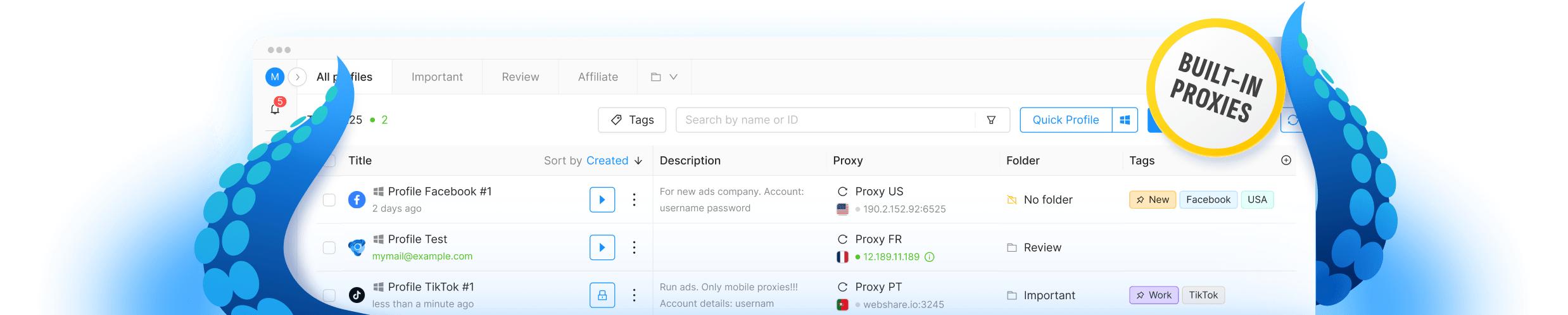
On the surface, an antidetect browser looks and feels like Chrome. Under the hood, it does something Chrome can’t. It lets you create many browser profiles, and each profile reports different answers to a website’s questions.
Profile one might present itself as a Windows desktop with an NVIDIA graphics card in New York. Profile two might look like a MacBook in London. Each profile keeps its own cookies, saved logins, cache, and history, sealed off from all the others. Nothing leaks between them. To a website, each profile is a stranger walking in for the first time.
Where the fingerprint gets changed matters a lot. The best tools swap it at the browser core, or kernel, level instead of using a plugin bolted on top. Detection systems run deep checks on canvas drawing, audio output, and WebGL rendering. A surface-level mask fails those checks because the mask and the real hardware tell two different stories. A fingerprint changed at the kernel level passes, because the browser genuinely behaves like the device it claims to be. Top tools go one step further and build profiles from fingerprints collected from real physical devices, so nothing about the profile looks invented.
One more piece completes the setup: proxies. The browser handles the device story. A proxy handles the location story. Assign a different proxy to each profile and every account gets a fresh face and a fresh address. Together, they’re very hard to link.
What Do People Use Antidetect Browsers For?
Common uses include managing client ad accounts, running several online stores, affiliate marketing, web scraping, ad verification, and price research.
The core job is always the same: keep accounts separate that a platform would otherwise link together. The people who need that come from a handful of fields.
E-commerce sellers run several storefronts on Amazon, eBay, Etsy, or Shopify without the accounts getting tied to one another. Marketplaces link accounts aggressively, and one suspended store can drag down its siblings if they share a fingerprint.
Marketing agencies manage dozens of client ad accounts on Facebook, Google, and TikTok from a single office. Without profile isolation, one flagged client account can put every other client’s account under review. That’s a bad phone call to make.
Affiliate marketers test offers, angles, and creatives across many accounts and regions. Research and data teams scrape public pages and track competitor prices without getting blocked after the tenth request. Media buyers check that their ads actually display correctly in other countries. And some people use these tools for plain personal privacy, since fingerprint control is one of the few things that actually stops cross-site tracking.
Antidetect Browser vs. VPN vs. Incognito Mode
An antidetect browser changes your device fingerprint, a VPN changes your IP address, and incognito mode only deletes local browsing data.
These three tools get mixed up constantly, so here’s the difference at a glance.
| Tool | What It Changes | What It Misses | Best For |
| Antidetect browser | Your device fingerprint, plus separate cookies and storage for each profile | Your IP address (pair it with proxies) | Running many accounts that must stay separate |
| VPN | Your IP address and rough location | Your browser fingerprint | Getting past region blocks, safer public Wi-Fi |
| Incognito mode | Deletes cookies and history when you close the window | Your fingerprint and your IP address | Hiding your history on a shared computer |
For serious multi-account work, the answer usually isn’t picking one. Professionals pair an antidetect browser with quality proxies, one proxy per profile, and skip incognito mode entirely.
How to Choose an Antidetect Browser
Look for kernel-level fingerprint spoofing, fast browser core updates, real-device fingerprint data, team tools, automation support, and a built-in proxy manager.
Quality varies wildly in this market, and the cheap tools tend to fail the exact checks that matter. Public fingerprint testers like Pixelscan exist for a reason. Before paying for anything, check for five things.
First, kernel-level spoofing. If a tool changes fingerprints with a browser extension or a thin overlay, deep hardware checks will expose it. Second, update speed. Chrome ships a new version about every four weeks, and a profile running last quarter’s version stands out like a costume at a job interview. Third, team features. Agencies need roles, shared profile access, and a record of who touched what. Fourth, an automation API, because scaling past a few dozen profiles by hand is misery. Fifth, a built-in proxy manager that handles HTTP, SOCKS5, and SSH, so you can attach and test proxies without leaving the app.
A tool like Octo Browser shows what this list looks like in practice. It runs on the latest Chromium core and updates shortly after each Chrome release, so profiles blend in with the crowd of everyday Chrome users. Its fingerprints come from real physical devices and get swapped at the kernel level, which is why its profiles pass the deep checks that trip up weaker tools. Teams get roles, shared access, and two-factor login, and its API plugs into Puppeteer, Selenium, and Playwright for automation. The MAC affiliate conference named it Best Antidetect Browser in 2024, and solo plans start at 29 euros a month.
Whatever tool you pick, test it before trusting it with real accounts. Create a profile, run it through a public fingerprint checker, and see if anything looks mismatched. Ten minutes of testing beats ten banned accounts.
Are Antidetect Browsers Legal?
Antidetect browsers are legal software in most countries, though each platform sets its own rules about running multiple accounts.
Owning and using one is legal in most places, the same way owning a VPN is legal. The software simply controls what your browser shares about your device. Privacy laws in many regions actually push in the same direction, limiting how companies can track people.
What you do with the tool is a separate question. Managing client accounts with permission, protecting your own privacy, verifying ads, and doing market research are ordinary business activities. Fraud is illegal with or without an antidetect browser. It’s also worth reading the terms of service on each platform you work with, since some restrict multiple accounts even when every account is legitimate. Know the rules before you scale.
Frequently Asked Questions
Is an antidetect browser the same as a VPN?
No. A VPN hides your IP address, while an antidetect browser changes the fingerprint your device shows to websites.
Most professionals use both at once. The browser handles the device identity, and a proxy or VPN handles the network identity. One without the other leaves half the trail visible.
Can websites detect antidetect browsers?
Websites can spot low-quality antidetect browsers, but tools that spoof fingerprints at the kernel level are much harder to detect.
Detection systems look for mismatches, like a profile that claims to be a MacBook but renders graphics like a Windows machine. Cheap tools create those mismatches. Well-built ones don’t, though no tool stays undetectable forever without constant updates.
Do I still need proxies with an antidetect browser?
Yes. An antidetect browser changes your device fingerprint but not your IP address, so each profile still needs its own proxy.
Ten perfect profiles sharing one IP address still look like one person. Residential or mobile proxies work best for accounts on strict platforms.
How much does an antidetect browser cost?
Entry plans typically cost 10 to 30 euros per month, while team plans with hundreds of profiles and API access run 100 to 350 euros.
Price usually scales with the number of profiles, team seats, and automation limits. Compare the cost against what one banned ad account or store would cost you, and the math gets simple.
Will an antidetect browser stop every ban?
No tool prevents all bans, because platforms also review account behavior, payment methods, and posted content.
A clean fingerprint stops accounts from being linked to each other. It won’t rescue an account that breaks platform rules on its own. Good tools plus sensible account behavior is the winning combination.
The Short Version
Browser fingerprinting quietly decides which of your accounts survive, whether you knew it existed or not. If you manage more than a couple of accounts for work, an antidetect browser stopped being a nice extra a while ago. It’s basic equipment now.